
Push buttons
| Component | Push buttons |
| Type | Input |
| Function | Handle input from a user |
Introduction
A push button is a simple input device that is used to control an electronic system. It is a type of switch that is activated by pressing it. When the button is pressed, it makes an electrical connection and sends a signal to the system. Push buttons are commonly used in applications such as keyboards, remote controls, and other devices that require user input.
Pin Description
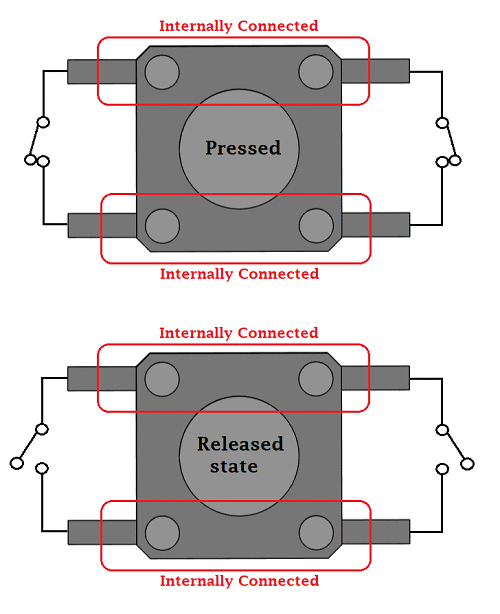
A push button has two pins. When the button is pressed, it makes an electrical connection between the two pins, which sends a signal to the system. You can connect the push button to a digital pin on a microcontroller to read the state of the button. You can use a pull-up or pull-down resistor to ensure that the pin has a defined state when the button is not pressed.
Most push buttons have 4 pins, these are internally connected.
Code Example
The following code example demonstrates how to read the state of a push button using an Arduino board.
```c
define BUTTON_PIN 2 // define the button pin
void setup() { Serial.begin(9600); // start serial communication at 9600 bps pinMode(BUTTON_PIN, INPUT_PULLUP); // set the button pin as input with pull-up resistor }
void loop() { int buttonState = digitalRead(BUTTON_PIN); // read the state of the button Serial.println(buttonState); // print the state to the serial port delay(100); // wait for 100ms } ```
(This example uses the Serial library to print the button state to the serial port. You can view the output using the Serial Monitor in the Arduino IDE.)